

Unsloth Dynamic 3.0 Quants
Collection
Introducing Dynamic V3.0 quants, our new SOTA quantization methodology. • 9 items • Updated • 95
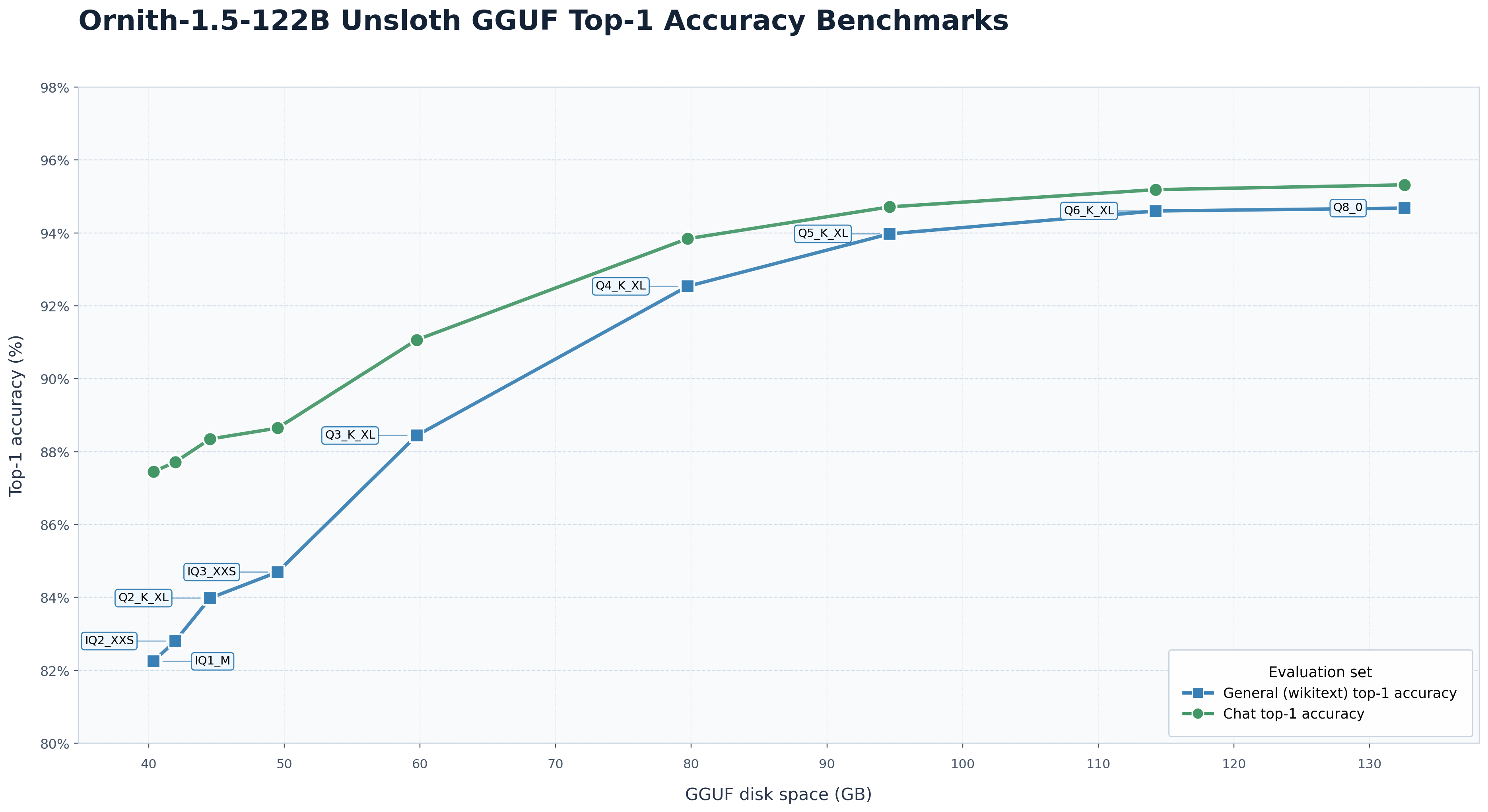
See Unsloth Dynamic 3.0 GGUFs for our quantization benchmarks.





Chirp Chirp! 🐦 We are introducing Ornith-1.5, a major step toward building foundation models through end-to-end self-improvement.
Ornith-1.5 extends Ornith-1.0 (which was developed on top of Qwen3.5 and Gemma4 with additional continued pretraining, mid-training, and post-training) by expanding the self-improvement loop from scaffold and rollout optimization to jointly optimizing task generation, scaffold construction, and solution rollouts. Rather than relying on a fixed set of human-curated tasks and manually designed harnesses, Ornith-1.5 continuously generates new training tasks, discovers effective strategies for solving them, and improves the policy through reinforcement learning. For more details on the task, harness, and rollout reward design, please refer to our blog.

This model card documents Ornith-1.5-122B, the most lightweight member of the Ornith-1.5 family — a 122B MOE model designed for efficient single-GPU deployment, and edge-deployable on mobile devices via its quantized Ornith-1.5-122B-Mobile variant.
| Ornith-1.5-122B | Qwen3.8-Flash-Next (125B) | Qwen3.8 (27B dense) | Nemotron 3.5 Super VL (120B) | DeepSeek-V4-Flash-0731 (284B) | Beam (501B) | |
|---|---|---|---|---|---|---|
| Coding | ||||||
| TerminalBench 2.1 | 81.2 | 83.4 | 71.9 | 66.7 | 82.7 | 80.1 |
| CyberGym | 80 | 78 | 55 | 34 | 76.7 | 59 |
| NL2Repo | 51.2 | 45.2 | 42.3 | 21 | 54.2 | 49.4 |
| SWE-bench Pro (no-hack) | 76.9 | 43.9 | 65.5 | 42.5 | - | 57 |
| Reasoning | ||||||
| HLE (with tools) | 48 | 38 | 31.3 | 33.2 | 50.8 | 51.1 |
| Agentic | ||||||
| WideSearch | 75.2 | 71.8 | 62.6 | 69.2 | 77.3 | 68.5 |
| BrowseComp | 78.5 | 75.3 | 71.4 | 61 | 80.2 | 67.6 |
| MCP-Atlas | 74.6 | 74.1 | 69 | 63.3 | 74.6 | - |
| Toolathlon-Verified | 70.8 | 71.4 | 67.1 | 60.1 | 70.3 | 63.5 |
* Terminal-Bench 2.1 (Terminus-2): We evaluate Terminal-Bench 2.1 using the Harbor/Terminus-2 framework with parser=json, temperature=1.0, top_p=1.0, and a 128K context window. Each run uses a 4-hour timeout with 32 CPU cores and 48GB RAM. We adjust the Qwen chat template to ensure consistency between training and inference (https://huggingface.co/ornith-ai/Ornith-1.5-122B/blob/main/chat_template.jinja), and modify Harbor to align with vLLM's reasoning_content key.
* Terminal-Bench 2.1 (Claude Code): We evaluate Terminal-Bench 2.1 using Claude Code 2.1.126 with parser=json, temperature=1.0, top_p=1.0, max_new_tokens=131072. Results are averaged over 5 runs. Again, Qwen chat template needs to be modified.
SWE-Bench Verified, Pro, and Multilingual: Evaluated using the OpenHands harness with temperature=1.0, top_p=0.95, and a 256K context window. Anti-hacking safeguards are applied throughout evaluation: models are explicitly informed of potential reward-hacking behaviors and instructed to avoid them. Any solution that still exhibits such behavior is marked incorrect.
* SWE Atlas QnA: using mini SWE agent harness with temp=1.0, top_p=0.95, 128K context window. Results are averaged over 5 runs.
* NL2Repo: with temperature=1.0, top_p=1.0, 400K context, 48K output. Access to specified GitHub repositories and pip packages is blocked to prevent reward hacking.
* HLE: Evaluated using Claude 4.6 Opus as the judge model.
* MCP-Atlas: All models were evaluated in thinking mode on the 500-task public subset, with a 10-minute timeout per task. We use Claude 4.8 Opus as the judge model.
* Toolathlon-Verified: We use the official evaluation service with the maximum token limit set to 128K.
* ClawEval: An agentic code benchmark over real-user task distributions; temp=0.6 and 256K context.
Ornith-1.5-122B is a reasoning model: by default the assistant turn opens with a <think> … </think> block before the final answer. The serving recipes below enable a reasoning parser so the chain-of-thought is returned in a separate reasoning_content field, and a tool-call parser so the model's <tool_call> blocks are surfaced as OpenAI-style tool_calls.
Serving Ornith-1.5-122B requires recent runtimes:
Recommended sampling parameters:
temperature=1.0, top_p=0.95, top_k=20, min_p=0.0, presence_penalty=1.5, repetition_penalty=1.0temperature=0.6, top_p=0.95, top_k=20, min_p=0.0, presence_penalty=0.0, repetition_penalty=1.0Ornith-1.5-122B is a MOE 122B model, so it serves on a single 80GB GPU. The recipes below stand up an OpenAI-compatible server; add --tensor-parallel-size / --tp if you want to shard across more GPUs.
vllm serve ornith-ai/Ornith-1.5-122B --served-model-name Ornith-1.5-122B --host 0.0.0.0 --port 8000 --max-model-len 262144 --gpu-memory-utilization 0.90 --enable-prefix-caching --enable-auto-tool-choice --tool-call-parser qwen3_xml --reasoning-parser qwen3 --trust-remote-code
python -m sglang.launch_server --model-path ornith-ai/Ornith-1.5-122B --served-model-name Ornith-1.5-122B --host 0.0.0.0 --port 8000 --context-length 262144 --mem-fraction-static 0.85 --tool-call-parser qwen3_coder --reasoning-parser qwen3
Ornith-1.5-122B handles context windows of up to 262,144 tokens. When a task's combined input and output must go beyond this limit, we suggest extending the effective window with RoPE scaling — YaRN is the technique we validate against, and it is already built into both vLLM and SGLang. With a scaling factor of 4.0, the usable window grows to roughly 1M tokens.
You can turn YaRN on in either of two ways:
Edit the checkpoint's config.json. Add a rope_scaling block to the model configuration:
{
    "rope_scaling": {
        "rope_type": "yarn",
        "factor": 4.0,
        "original_max_position_embeddings": 262144
    }
}
Override at launch time. Leave the checkpoint untouched and extend the serve commands above with the equivalent flags.
vLLM:
VLLM_ALLOW_LONG_MAX_MODEL_LEN=1 vllm serve ornith-ai/Ornith-1.5-122B ... --hf-overrides '{"rope_scaling": {"rope_type": "yarn", "factor": 4.0, "original_max_position_embeddings": 262144}}' --max-model-len 1000000
SGLang:
SGLANG_ALLOW_OVERWRITE_LONGER_CONTEXT_LEN=1 python -m sglang.launch_server ... --json-model-override-args '{"rope_scaling": {"rope_type": "yarn", "factor": 4.0, "original_max_position_embeddings": 262144}}' --context-length 1000000
Open-source runtimes implement YaRN statically: the same scaling factor is applied to every request regardless of its length, which can slightly hurt quality on ordinary-length inputs. Only enable rope_scaling when your workload genuinely needs the longer window, and size factor to match it — the target window is roughly factor × 262,144, so if your requests top out around 524,288 tokens, factor: 2.0 is the better setting.
Once a vLLM or SGLang server is running, talk to it with any OpenAI-compatible client.
from openai import OpenAI

client = OpenAI(
    base_url="http://localhost:8000/v1",
    api_key="EMPTY",  # any non-empty string works for a local server
)

response = client.chat.completions.create(
    model="Ornith-1.5-122B",
    messages=[
        {"role": "user", "content": "Write a one-line Python lambda that squares a number."}
    ],
    temperature=0.6,
    top_p=0.95,
    max_tokens=1024,
)

message = response.choices[0].message
# reasoning_content holds the <think> trace; content holds the final answer.
print("reasoning:", getattr(message, "reasoning_content", None))
print("answer:", message.content)
You can also stream tokens, or hand the model tools — Ornith-1.5-122B emits well-formed function calls that the server parses into the standard tool_calls field:
tools = [
    {
        "type": "function",
        "function": {
            "name": "get_weather",
            "description": "Get the current weather for a city",
            "parameters": {
                "type": "object",
                "properties": {"city": {"type": "string"}},
                "required": ["city"],
            },
        },
    }
]

response = client.chat.completions.create(
    model="Ornith-1.5-122B",
    messages=[{"role": "user", "content": "What is the weather in Paris right now?"}],
    tools=tools,
    tool_choice="auto",
    temperature=0.6,
    max_tokens=2048,
)

tool_call = response.choices[0].message.tool_calls[0]
print(tool_call.function.name, tool_call.function.arguments)
# -> get_weather {"city": "Paris"}
You can point any OpenAI-compatible SDK (Python, Node.js, etc.) or curl at the same /v1/chat/completions endpoint.
Ornith-1.5-122B exposes an OpenAI-compatible endpoint with tool calling, it works out of the box with standard agent frameworks.
Examples of using Ornith with agents:
ollama run ornith-1.5:122b
# Both runtimes load a GGUF build of Ornith (publish one at ornith-ai/Ornith-1.5-122B-GGUF).

# llama.cpp — serve an OpenAI-compatible API on port 8000.
llama-server -hf hf.co/ornith-ai/Ornith-1.5-122B-GGUF --port 8000 -c 262144
# Both runtimes load a GGUF build of Ornith (publish one at ornith-ai/Ornith-1.5-122B-GGUF).

# llama.cpp — serve an OpenAI-compatible API on port 8000.
llama-server -hf hf.co/ornith-ai/Ornith-1.5-122B-GGUF --port 8000 -c 262144
# Hermes talks to any OpenAI-compatible endpoint — point it at your Ornith server.
export OPENAI_BASE_URL="http://localhost:8000/v1"
export OPENAI_API_KEY="EMPTY"
export MODEL="ornith-ai/Ornith-1.5-122B"
# OpenClaw talks to any OpenAI-compatible endpoint — point it at your Ornith server.
export OPENAI_BASE_URL="http://localhost:8000/v1"
export OPENAI_API_KEY="EMPTY"
export OPENAI_MODEL="ornith-ai/Ornith-1.5-122B"
pip install unsloth

# Load Ornith for fast local inference or fine-tuning (Python):
#   from unsloth import FastLanguageModel
#   model, tokenizer = FastLanguageModel.from_pretrained(
#       "unsloth/Ornith-1.5-122B-GGUF",
#       max_seq_length=262144,
#       load_in_4bit=True,
#   )
Ornith-1.5-122B is optimized for terminal-based coding agents. Point any OpenAI-compatible coding CLI at your Ornith-1.5-122B endpoint (set OPENAI_BASE_URL and OPENAI_API_KEY) to understand large codebases, automate tedious work, and ship faster.
# Register your local Ornith endpoint as a provider in ~/.config/opencode/opencode.json:
#
# {
#   "$schema": "https://opencode.ai/config.json",
#   "provider": {
#     "ornith": {
#       "npm": "@ai-sdk/openai-compatible",
#       "name": "Ornith (local)",
#       "options": { "baseURL": "http://localhost:8000/v1", "apiKey": "EMPTY" },
#       "models": { "ornith-ai/Ornith-1.5-122B": { "name": "Ornith-1.5-122B" } }
#     }
#   }
# }

opencode
If you find our work helpful, feel free to give us a cite.
@misc{ornith_1_5,
    title = {{Ornith-1.5}: From Self-Scaffolding to Self-Improvement},
    url = {https://ornith.ai/ornith_1_5.html},
    author = {{Ornith Team}},
    year = {2026}
}
1-bit
2-bit
3-bit
4-bit
5-bit
6-bit
8-bit
16-bit
Base model
ornith-ai/Ornith-1.5-122B